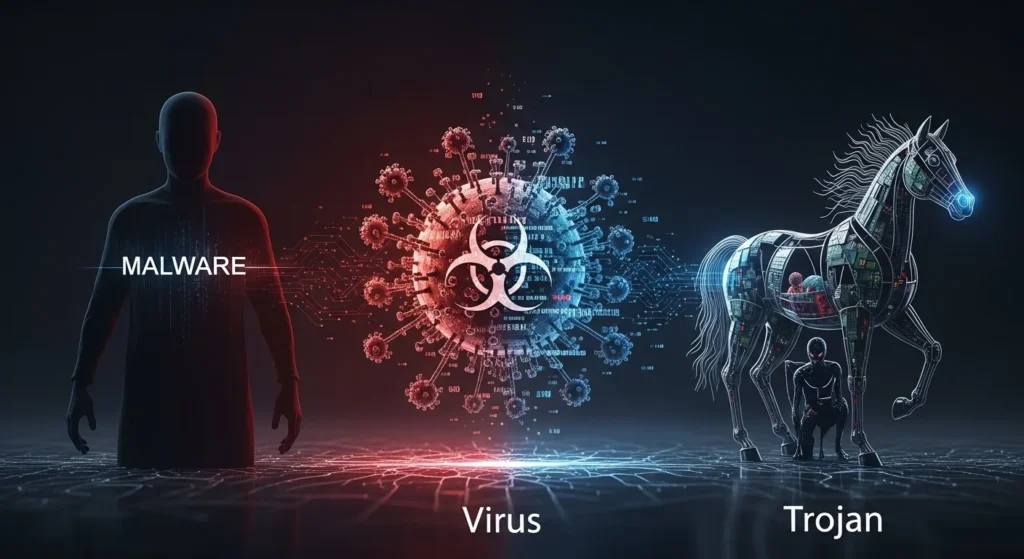
The Confusion That Hackers Count On
Most people use these words interchangeably:
- “I got a virus.”
- “It must be malware.”
- “Maybe it was a Trojan.”
They sound like the same thing.
And honestly, that confusion is normal.
Cyber threats are invisible.
They don’t come with warning labels.
And attackers love when people don’t understand what hit them.
Because when you don’t know the difference…
You don’t know how to defend yourself properly.
So let’s clear it up today—with real examples, simple explanations, and expert clarity.
By the end of this article, you’ll understand:
✅ What malware really is
✅ What makes a virus unique
✅ Why Trojans are so dangerous
✅ How these threats actually infect devices
✅ What protection steps truly matter
Why This Matters Today (Even for “Normal” People)
A common myth is:
“Cyberattacks only happen to big companies.”
Not true.
Modern attacks are automated.
Hackers target:
- everyday laptops
- smartphones
- home Wi-Fi networks
- small businesses
- students
- remote workers
And most victims never even realize what type of threat they encountered.
Knowing whether something is a virus, Trojan, or malware isn’t just technical.
It’s practical.
It can determine:
- how you remove it
- how much damage it causes
- whether your accounts are compromised
- how to prevent it next time
First Things First: What Is Malware?
Let’s start with the umbrella term.
Malicious software designed to harm, exploit, or steal from a device or network.
Malware is not one specific thing.
It’s a category—like “crime.”
Just like crime includes theft, fraud, assault…
Malware includes:
- viruses
- Trojans
- ransomware
- spyware
- worms
- adware
So here’s the simplest truth:
All viruses are malware.
All Trojans are malware.
But not all malware is a virus or Trojan.
That one sentence clears up 80% of the confusion.
Malware: The Whole Family of Digital Threats
Think of malware as the “family name.”
Within that family are different types of attackers.
Each behaves differently.
Some destroy files.
Some spy on you.
Some pretend to be harmless.
Some spread automatically.
Understanding the type matters.
Because the defense is different for each.
What Is a Computer Virus? (And Why It’s Called That)
A virus is a type of malware that spreads by attaching itself to legitimate files.
Just like a biological virus needs a host…
A computer virus needs a file or program to survive.
Key trait of a virus:
✅ It replicates and spreads when the infected file runs.
Viruses often spread through:
- USB drives
- email attachments
- shared downloads
- outdated software
Real-life example:
You download a cracked software program.
It includes a hidden infected file.
When you open it:
- the virus activates
- it copies itself
- it infects other files
That is classic virus behavior.
What Viruses Typically Do
Viruses can:
- corrupt system files
- slow down devices
- delete documents
- spread across networks
- open backdoors for hackers
They’re destructive.
But in many modern attacks…
Viruses aren’t the most common threat anymore.
Trojans are.
What Is a Trojan? (The Most Deceptive Malware Type)
A Trojan horse is malware disguised as something legitimate.
It doesn’t replicate like a virus.
Instead…
It tricks you into inviting it in.
Just like the Trojan Horse in Greek mythology:
A “gift” that secretly contained enemy soldiers.
Key trait of a Trojan:
✅ It looks safe, but delivers a hidden attack.
Trojans often arrive as:
- fake software downloads
- “security updates”
- email attachments
- pirated games
- malicious mobile apps
Real-life Trojan Example
You get an email:
“Your invoice is attached.”
You open the attachment.
Nothing happens.
But behind the scenes…
The Trojan installs:
- a keylogger
- a backdoor
- remote access for hackers
No alarm. No obvious virus.
Just silent compromise.
That’s why Trojans are terrifying.
Quick Breakdown: Malware vs Virus vs Trojan
Let’s make it crystal clear:
Malware = The umbrella term
Virus = Self-replicating malware that attaches to files
Trojan = Disguised malware that tricks users into installing it
Comparison Table: Malware vs Virus vs Trojan
| Feature | Malware (General) | Virus | Trojan |
|---|---|---|---|
| Meaning | Any malicious software | Malware that replicates through files | Malware disguised as legitimate software |
| Spreads automatically? | Sometimes | ✅ Yes | ❌ No |
| Requires user action? | Often | Sometimes | ✅ Almost always |
| Main tactic | Harm or exploitation | Infect + spread | Deception + hidden access |
| Common goal | Steal, destroy, spy | Damage + replication | Steal data or allow remote control |
| Example | Spyware, ransomware | Infected file attachment | Fake banking app |
Why Trojans Are More Dangerous Than Viruses Today
Viruses are loud.
They break things.
They leave signs.
Trojans are quiet.
They steal quietly.
Modern cybercrime is less about destruction…
And more about access.
Hackers want:
- banking logins
- business accounts
- identity data
- cloud passwords
- remote control
That’s why Trojans dominate modern attacks.
Other Malware Types People Confuse With Viruses
Many people call everything a “virus,” but malware includes more:
Spyware
Secretly watches what you do.
Ransomware
Locks your files until you pay.
Worms
Spread automatically without needing a host file.
Adware
Bombards you with ads and tracking.
Keyloggers
Records what you type—especially passwords.
Understanding these categories helps you respond correctly.
Common Mistakes People Make (That Get Them Infected)
Let’s be honest—most infections come from habits.
Here are the biggest mistakes:
- Downloading cracked or pirated software
- Clicking urgent email links
- Ignoring browser warnings
- Using weak passwords
- Skipping system updates
- Trusting unknown mobile apps
- Assuming antivirus is enough
Cybersecurity isn’t about paranoia.
It’s about awareness.
Hidden Tip: The Most Dangerous Malware Looks Normal
The scariest malware today doesn’t crash your computer.
If your device suddenly shows:
- unusual pop-ups
- slow performance
- unknown programs
- login alerts from strange locations
- excessive network usage
Don’t ignore it.
Silent threats are often the worst ones.
Actionable Steps to Protect Yourself From All Three
Here’s a simple layered defense plan:
✅ 1. Use Antivirus (Still Important)
Antivirus helps detect known threats.
But don’t rely on it alone.
✅ 2. Enable Multi-Factor Authentication
Even if malware steals your password, MFA blocks access.
✅ 3. Never Download From Untrusted Sources
Most Trojans come from “free downloads.”
✅ 4. Keep Software Updated
Updates patch security holes viruses exploit.
✅ 5. Back Up Important Files
Ransomware is still malware—and backups defeat it.
✅ 6. Learn to Spot Phishing
The human layer is often the weakest link.
Key Takeaways (Quick Summary)
- Malware is the umbrella term for all malicious software
- A virus spreads by attaching itself to legitimate files
- A Trojan disguises itself and relies on deception
- Trojans are especially dangerous because they steal silently
- Not all malware spreads automatically
- Real protection requires layered cybersecurity, not just antivirus
FAQ: Malware vs Viruses vs Trojans
1. Is a Trojan the same as a virus?
No. A virus replicates and spreads through files, while a Trojan disguises itself as legitimate software.
2. Can antivirus detect Trojans?
Sometimes, but advanced Trojans often bypass basic antivirus tools through stealth and encryption.
3. What’s the most common malware today?
Trojans and ransomware are among the most common because they generate financial profit for attackers.
4. How do I know if my device has malware?
Signs include slowdowns, pop-ups, unknown apps, unusual logins, or suspicious network activity.
5. What’s the best defense against malware overall?
A layered approach: antivirus + MFA + safe browsing + updates + backups.
Conclusion: Knowing the Difference Could Save You
Calling everything a “virus” is like calling every crime “theft.”
Cyber threats come in different forms.
And each one attacks differently.
Malware is the umbrella.
Viruses spread through infection.
Trojans trick you into opening the gate yourself.
When you understand the difference…
You stop guessing.
You start defending.
And in today’s digital world…
that knowledge is one of the strongest security tools you can have.

Natalia Lewandowska is a cybersecurity specialist who analyzes real-world cyber attacks, data breaches, and digital security failures. She explains complex threats in clear, practical language so everyday users can understand what really happened—and why it matters.
Pingback: Antivirus Alone Won’t Protect You Anymore — Here’s What You Actually Need